How to add floating license?
To install floating license tokens, you have to use the Wlmadmin.exe application, available from :
For TopSolid v6 :
- the folder ftp://ftp.topsolid.com/Public/TopSolid/Drivers/Sentinel/ (copy/paste this link into your Windows file explorer), download the WlmAdmin.zip file and unzip it into the folder of your choice.
- the folder Documents\Setup\Redist\Sentinel RMS License Manager\Tools\WLMAdmin of the installation media (see the https://faq.topsolid.com/?action=faq&cat=1&id=61&artlang=en page for downloading a version of TopSolid).
For TopSolid7 :
- the folder Documents\Setup\Redist\Sentinel RMS License Manager\Tools\WLMAdmin of the installation media (see the https://faq.topsolid.com/?action=faq&cat=1&id=61&artlang=en page for downloading a version of TopSolid).
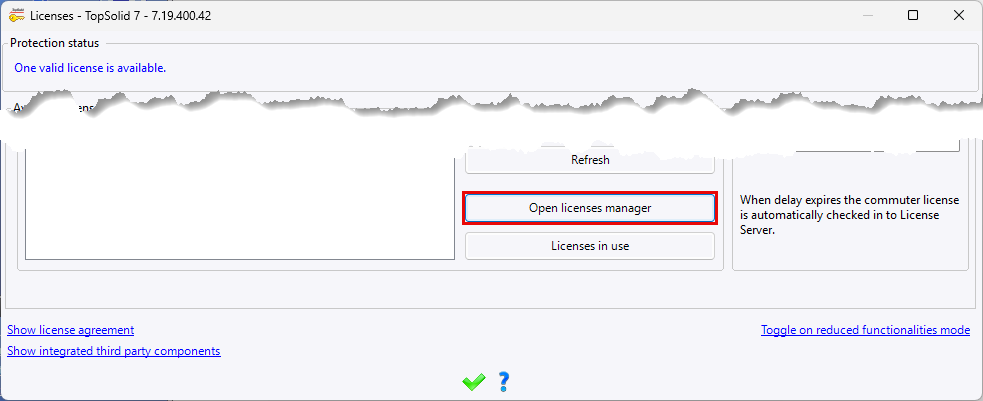
- by launching the Help > Licenses... command, then from the Floating Licenses tab, click on the Open licenses manager button.
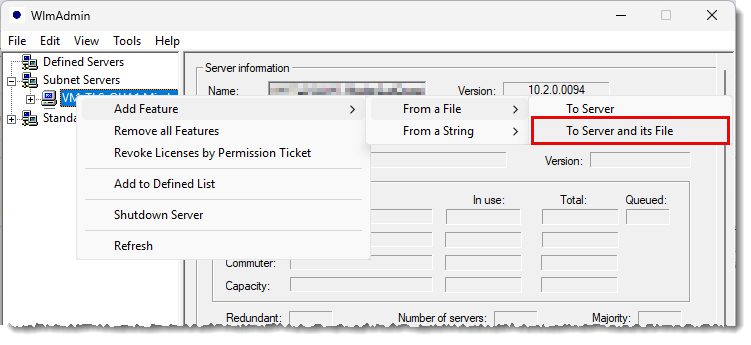
In the tree on the left of the WlmAdmin application, unfold the Subnet Servers node, right-click on the name of your license server, then run the Add feature > From a file > To Server and its File command and select the *.lic file sent to you by the sales department.
Repeat this operation as many times as you have .lic files.
 |
The versions 6.27 and 7.20 require the version 10.3 of the Sentinel RMS License Manager. Do not use the Add feature > From a file > To Server command, otherwise your licenses will be lost the next time the server is rebooted. |